For finance teams
Supplier invoices and reconciliation for finance teams.
Management accountants, financial controllers, the AP desk: the people this page is for are the ones doing the keying, the ticking and the chasing. FINIO takes those three jobs, in that order, and leaves you the exceptions.
For UK groups with several Xero companies, or one company with several sites kept apart by tracking categories. Not built for a single site running one company.

The work
Today's exception queue.
What stops being your job, and what the queue holds instead.
Keying invoices
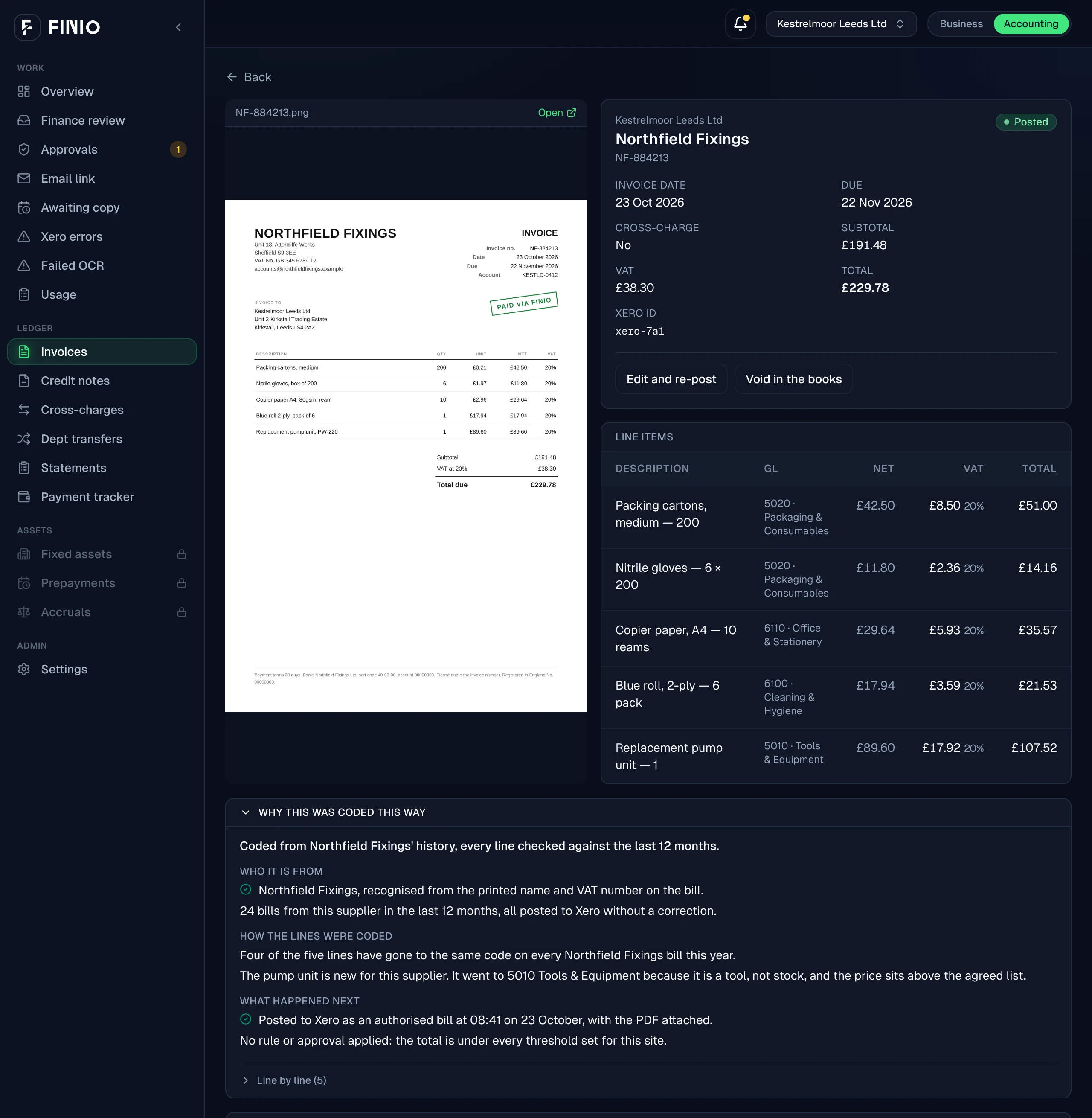
Every document arrives read and coded line by line against your own chart. Your queue is the exceptions, not the data entry.
Ticking off statements
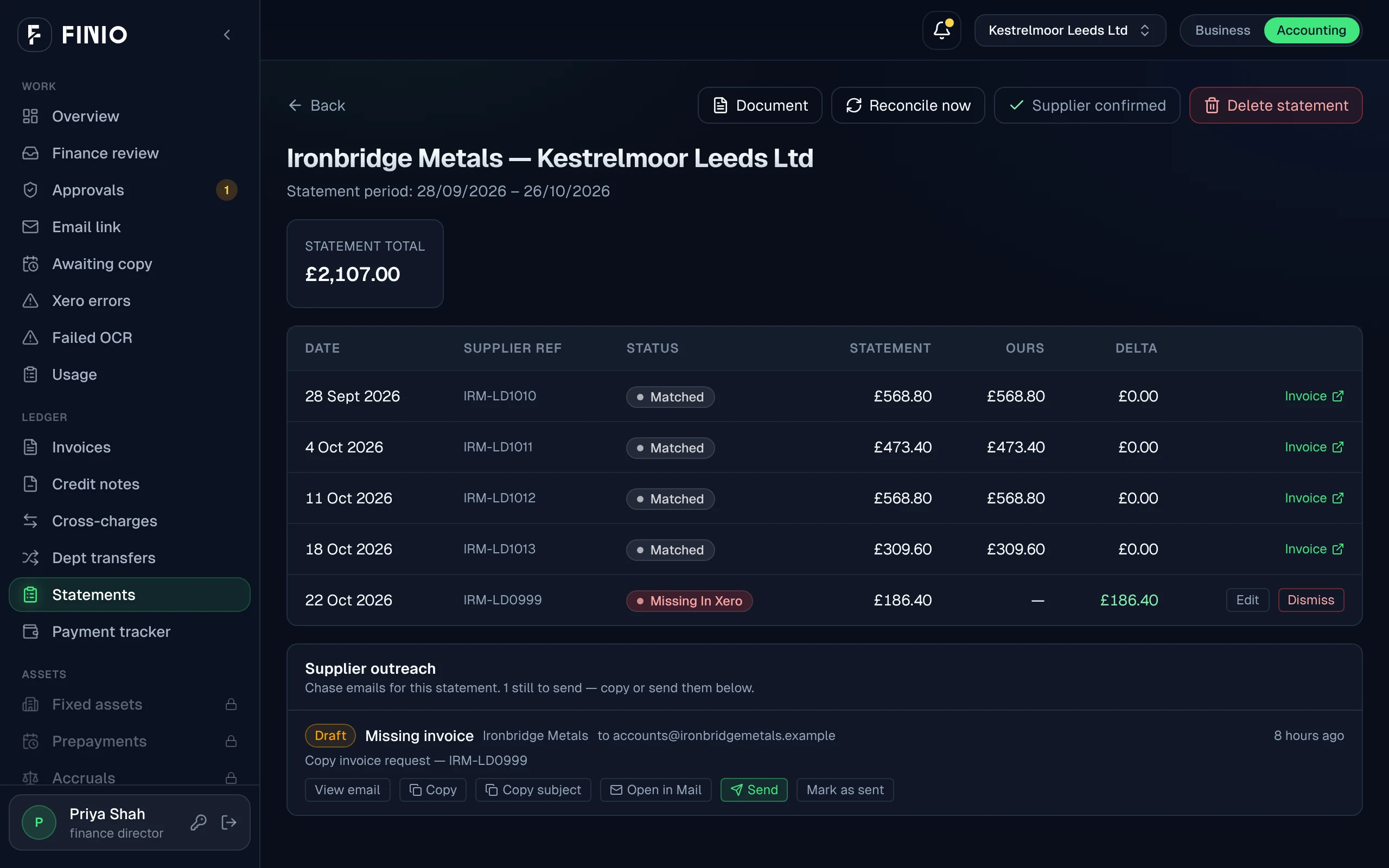
Supplier statements are matched line by line against the live ledger as they arrive: missing invoices, duplicates, unapplied credits, amounts that agree on the reference but not the value.
Chasing credit notes
Short deliveries and rejections are tracked from the day they happen, so credits get chased while the supplier still remembers the crate, not written off at month-end.
Hunting paperwork
Sites photograph delivery notes as they land, so the document trail builds itself during the month instead of being reconstructed in the last week of it.
Coding
Line coding and review.
Every line to an account in your chart, with the reason shown. You review what is held, not what posted.
Held for you
Missing invoices and credits.
The four things that land in your queue, each with both documents side by side.
- A delivery note that says eight cases against an invoice for ten
- A line priced above the agreed list
- A credit note that does not match the shortage it refers to
- A statement line with no invoice in Xero, and the chasing email already drafted
Statement season
Reconciliation walkthrough.
By hand
2 days
Across a multi-site group, at the start of the month
With FINIO
1–2 hrs
Measured in a sandbox entity at live volume. See how it was measured.
Month-end
Group AP tasks.
- Every payment's status, due, scheduled or paid, across the group on one screen. FINIO tracks; your bank pays
- Cross-charges raised in one company, approved in the other, and the journal posted into both Xero files
- Departmental transfers between sites raised and approved in real time, not journalled from a spreadsheet at close
- A close date that holds, because the first week's statement and query load is gone before it starts
Getting going
Setup and boundaries.
Connect Xero and send the first invoice; FINIO learns a year of history itself, with no mapping session. Three things it does not do today:
- Planned
Ordinary supplier-bill approvals
Routing every supplier bill for approval before it posts. The approval loop exists for cross-charges and transfers today; keep your existing approval tool for ordinary bills until this ships.
- Planned
Paying suppliers from FINIO
FINIO shows what is ready to pay. The bank still makes the payment.
- Planned
Accruals
Raised and reversed on schedule.
Bring a statement and watch it reconcile.
Or drop an invoice into the extraction demo and watch it code the lines.